On September 28 we released v1.1.1. The biggest change: online play and Share by code, which until now lived only in the test build, are in the release build. The rules gained a Turn limit and a Time limit. On top of that, everything the test build picked up over ten updates since v1.0.3 - money flow, auctions, CPU thinking, casino prizes and the way saves are written - reaches the release build at once. Last of all, following tester feedback, we revisited the waits the test builds had gained, and you can now play at v1.0.3's pace (we made this change on top of what was prepared as 1.1.0, so the version is 1.1.1). Here is what changed since v1.0.3.
Online play is in the release build
The online play we said would come "around 1.1" in the September 21 post is here. "Online play" on the title offers two ways to play.
- Matchmaking - pick a goal-money band and queue; the server finds you opponents
- Custom room - put up a room and settle the players, the rules and the pieces yourselves. Invite codes work too
- "Custom server" (playing on a server of your own) is not in yet
The server runs the match and keeps everybody's board the same. A room can use a board published on the server or one you made; players who do not have it get it, pictures and sounds included.
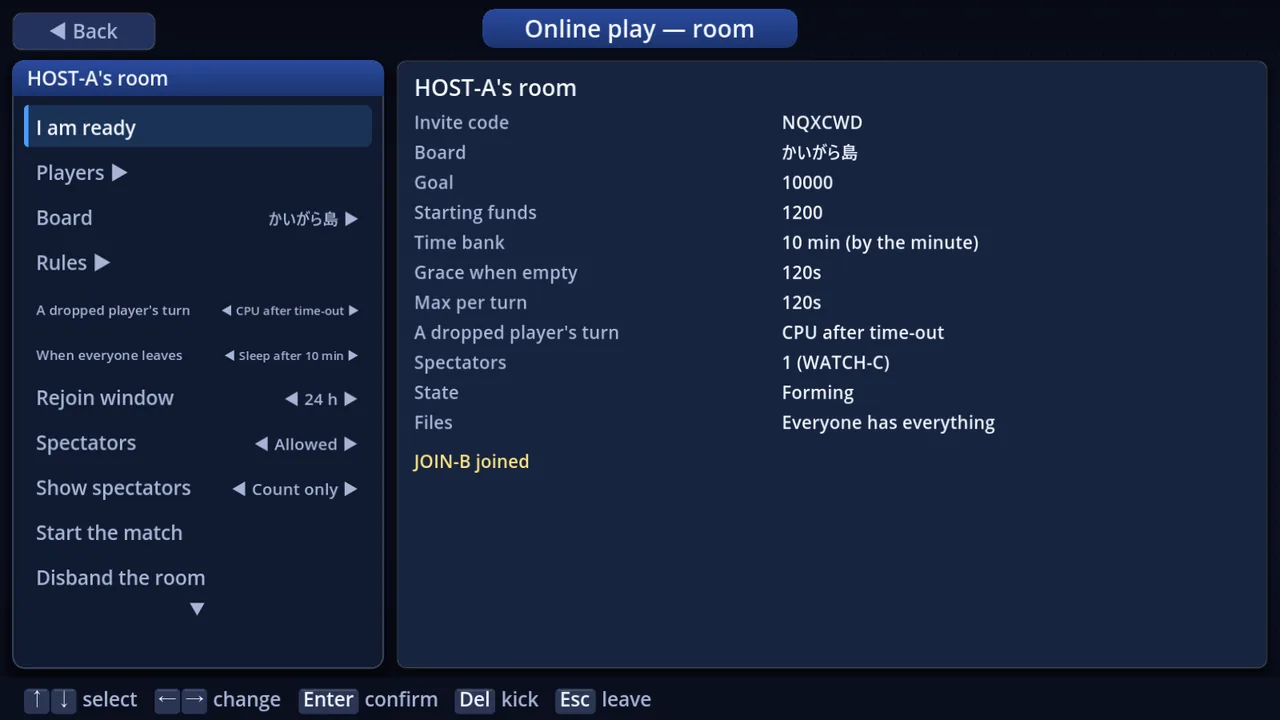 The host's room - the spectator settings and how many are watching
- Spectators - join a room as "Spectator" to watch without a seat, even a match already under way. A room holds at most 16 people, players and spectators together
- You see the acting player's screen - when it is not your turn you see what the acting player sees, with the text in your own language. CPU turns play on the same screens and with the same effects as offline
- Screens on someone else's turn - V opens the map, B the data, U the stocks and O the settings, view only
- Clocks - a room starts with a 10-minute time bank, 10 minutes max per turn and 120 seconds of grace once the bank is empty (the host can change them)
- Relief - on a time-out or a disconnect, Relief (a CPU) plays that turn. You keep your seat and come back to it when you return
- Negotiating with people - buying, selling and swapping shops, and item trades, now work between people online. The other player has 45 seconds to accept, change the terms, cancel or answer "No way". The proposer's clock stops while they think, and the other players and spectators see the deal, view only
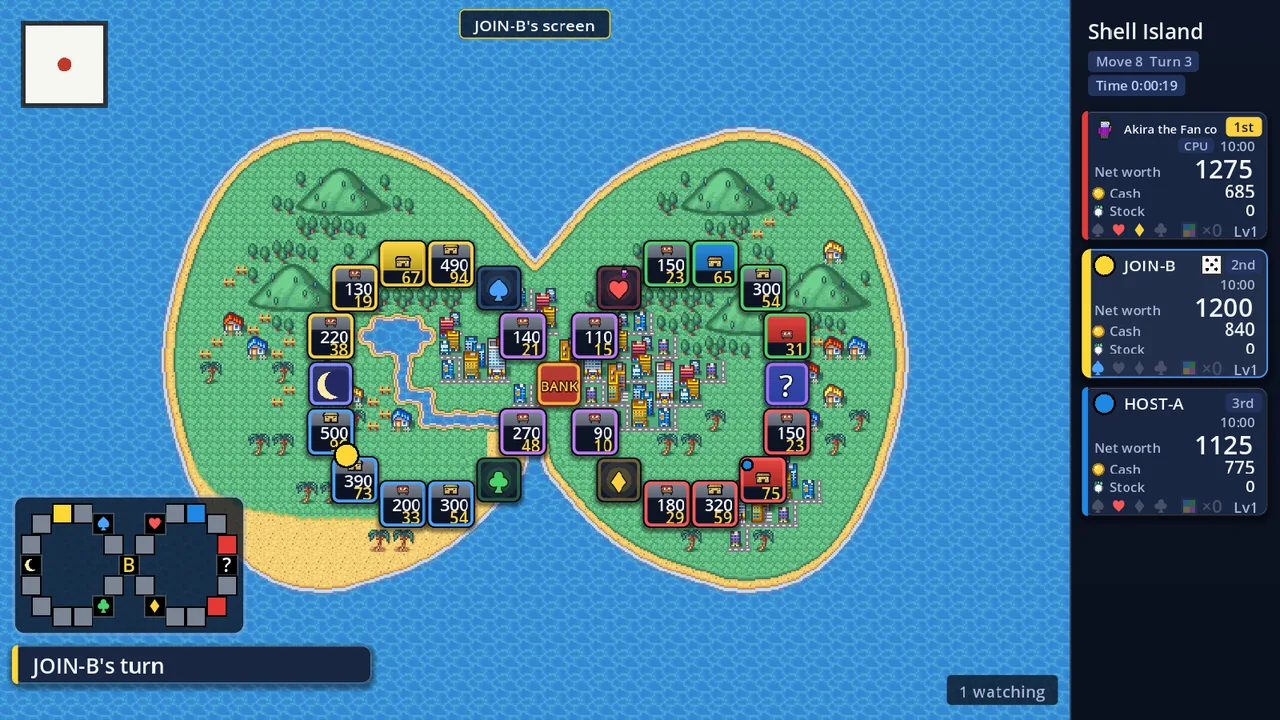 A spectator's screen - "JOIN-B's screen" at the top, "1 watching" bottom right
And one more thing: the release build v1.1.1 and the test build v1.1.1-test0 can sit at the same table. Both run the same engine version and both have the way into online play. Before, the release build had no online play, so its players could not meet test-build players.
Share by code
You can publish boards, texture packs, pieces and more so they are not listed anywhere and only people who have the share code can get them - handy for a board you play with friends, or a pack you want a few people to try before it is finished.
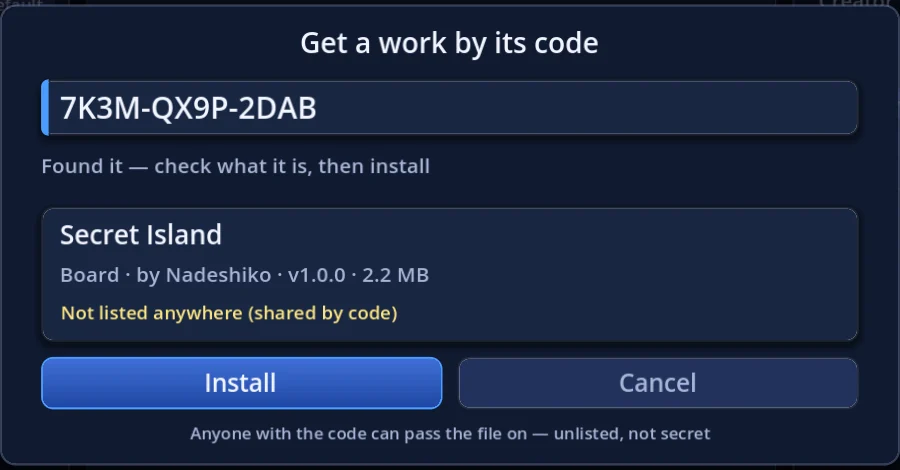 Get a work by its code
- To publish - for a board, tick "Share by code" at the bottom of the editor's publish window; for packs, set the share form's "Listing" row to "Share by code". A 12-character code is shown and copied to your clipboard (as with any upload, it becomes available after review)
- To get one - on "Online" press L ("By code" at the bottom), type the code and press Enter. Check the work's card, then press "Install". Case, hyphens, and O/0 or I/1 mix-ups don't matter, and you can paste the code
- To manage - "Online -> Account -> My uploads" switches a work between listed and shared by code, and can issue a new code
- Unlisted is not secret. When you issue a new code, boards installed with the old one leave those players' games at their next start. Theme songs cannot be shared by code
Turn limit and Time limit
The rules gained two new ways for a match to end besides the goal. Either way, the richest player wins when it ends.
- Turn limit - the match ends once every seat has taken that many turns
- Time limit - the match ends at the end of the round the clock runs out in (the clock also runs during auctions and casinos)
- Each one is None / Default (a number from the board and the goal) / a number you type. While either is on, you can set the goal to "None" and play to the limit alone
- The default is still the goal only. If you never open these rows, nothing changes
The time bank and Max per turn you already had work as before. Turning the time limit on with Max per turn at None sets it to 10 minutes, so a single turn cannot run forever.
Four new settings (from tester feedback)
- Landing name tag (title Settings -> Display / in-match settings) - a small plate naming the square a piece stops on, for a moment. Choose Off (default), No panel (only when the "Stop here?" panel did not show the square, e.g. after a warp), Special (not on shops, chance squares or suit squares) or All
- CPU "Stop here?" (title Settings -> Other / in-match settings) - a CPU's "Stop here?" now shows on screen. On (default) keeps it up for a moment (0.9 / 0.6 / 0.35 s by CPU speed); Off makes CPU turns snappier
- Pacing (title Settings -> Other / in-match settings) - "Standard" (default) or "Classic". Classic drops the waits added in this version and plays at v1.0.3's pace: a CPU's "Stop here?", the screen when a CPU passes a toll gate, the notice before a CPU's auction, and the time a CPU spends reading the 5x buyout line
- Menu help (title Settings -> Display / in-match settings) - the line under the turn menu and the Shops menu that describes the highlighted row. If you already know what the buttons do, set it to "Hidden" (it is Shown by default). A row you cannot use still says why when you press it
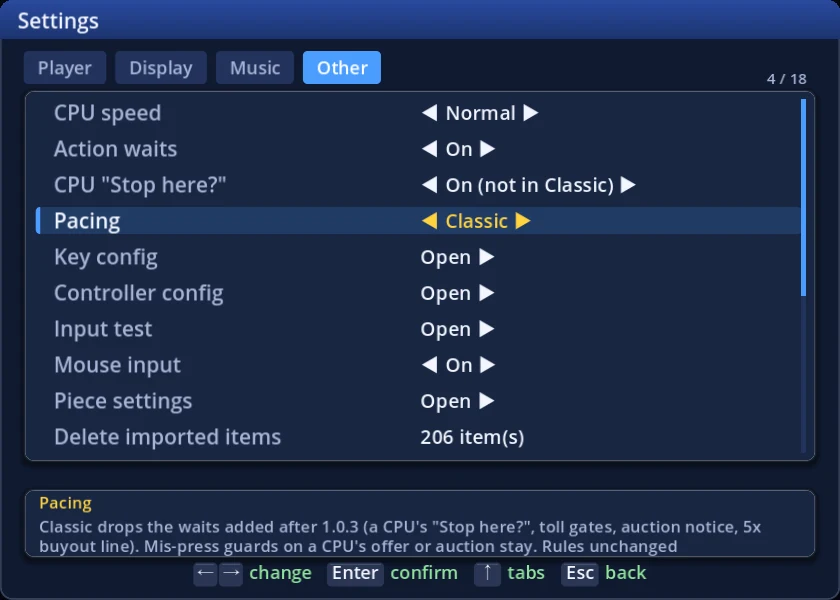 The "Pacing" setting - on Classic, the CPU "Stop here?" row above is not held even when On
Over the test builds we added small waits here and there so CPU turns would be easier to follow. Testers who played with other people told us that on CPU turns "we already knew what the CPU was doing", and that on their own turns "the payment box does not take my A press for a moment - it feels like input lag". So in this version:
- The payment and salary screens close on confirm the moment they open. Only a held button's repeat is ignored, so holding the walk's confirm still does not skip them unread
- "Classic" pacing drops all of the waits above. The waits that stop you mis-pressing a CPU's trade offer or auction stay in both (v1.0.3 had them too)
- "Action waits" set to Off now drops the waits added in this version as well
Rules and CPUs
In the test builds we compared the game with the latest entry in the series and moved the rules and the CPUs closer to it. All of that now reaches the release build.
- When you cannot pay - shop fees or toll booths you cannot cover no longer sell anything or bankrupt you on the spot. Your money goes negative, you play on, and you settle once at the end of your own turn. While you are short, the sidebar turns red and shows the shortfall
- Debt auctions - a shop sold to pay a debt goes straight to auction (a lot building together with its lot). With a person at the table, auctions open on screen even on a CPU turn at "Instant", so you can bid yourself
- "No way" - in a negotiation between people, the one being asked can answer "No way". The proposer then cannot offer the same deal on that shop to that player again for the rest of the turn (on one machine and online)
- Deals - a new value "No CPU->you": CPUs never propose deals to people
- Slot prizes - the new default "Modern" uses the latest original's prizes (777 pays your salary). "Legacy" keeps the old ones
- Number 9 - a new prize table built on a tester's proposal ("Modern" is the default; a sum of 24 pays your salary). The prize is paid on the result screen
- Holidaymon closures - how long a closure lasts is now a rule (the default follows the original)
- CPUs - they buy stock at the bank and, at every strength, aim for the suit marks they are missing. Strength 5 may cash out late or sell shares where the leader holds many. When a CPU makes a counter-offer, the cursor starts on "Decline"
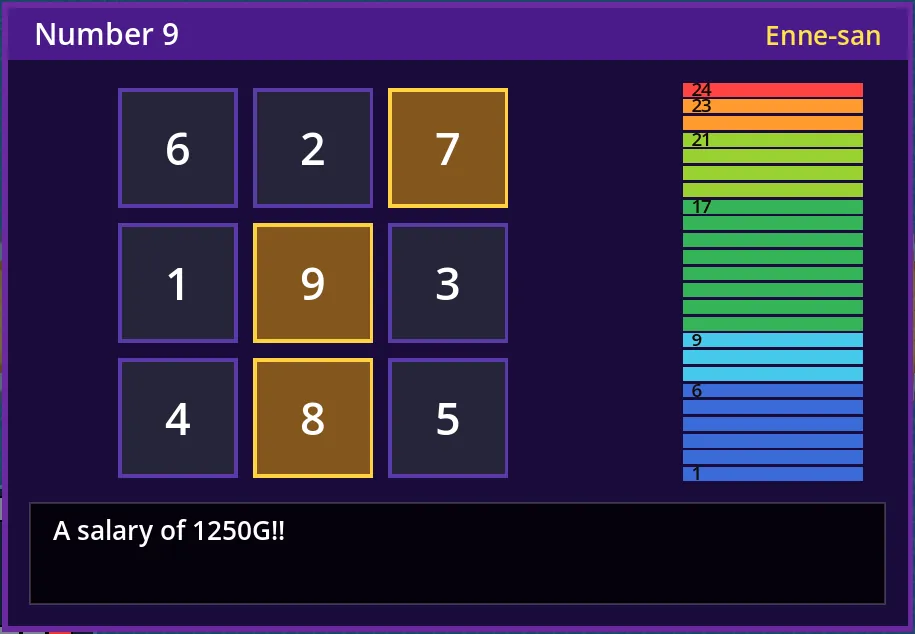 Number 9 - a sum of 24 pays your salary
New matches default to "Modern" for Number 9 and the slot prizes, and to "Legacy" (as the original) for Holidaymon closures. To play the old way, pick them in Ruleset (per element), or choose the "Legacy" rules preset.
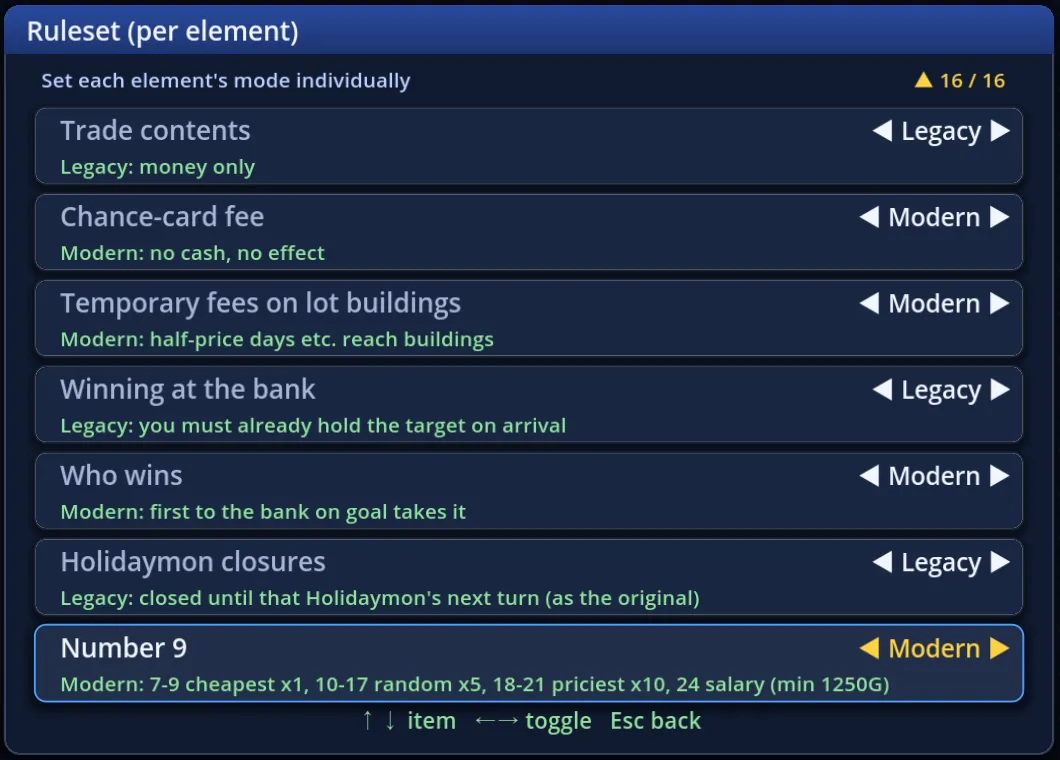 Ruleset (per element)
Screens and controls
- The turn menu and the Shops menu describe the row under the cursor; rows you cannot use right now are greyed out with the reason (the "Menu help" setting hides the description)
- On a CPU's or another player's turn you see the arrows for where they can move, and their "Stop here?"
- You can look at the data and stock screens while walking. When auto-move stops at a fork, press the direction of the road you want
- Auctions on one shared device take bids from each seat's number key or its "+10G" / "+100G" buttons
- Following player feedback, selling a shop by chance card and building on a vacant lot ask with the cursor on "Yes" again (selling to pay off a debt still starts on "No")
- The Move / Turn display now defaults to "Turn only" (it switches once, on the first start of this version)
- Settings use the same names on the title and in a match ("CPU speed", "Screen mode"). "Square digits" (Font / Pixel / Outlined) and "Mini-map view frame" are in both
- The default art of shops and lot buildings was redrawn. There are 4 new achievements, and 6 were revised
Saves that survive a power cut
After a report of an autosave broken by a power cut, we changed how files are written: everything goes to a separate file first, is flushed to the disk, and only then takes the real name. If the power goes mid-write, either the complete old version or the complete new one is left.
- Not just saves: settings, pieces, key and pad settings, records, achievements, editor saves - every file is written this way now
- The autosave keeps the previous one too. If the latest cannot be read, the game asks whether to resume from the previous one
- Opening an unreadable save no longer starts an empty match that overwrites the file
Online content and data
- A work shared by code could appear as a shelf cover on the board list. Fixed
- If a match starts while a work is downloading, it is installed after the match
- If data sending is on and you are signed in to an online account, the server is told which account sent it. Seat names, saves and the files of boards you made are still never sent. You can turn sending off in Settings -> Other -> Sending data
Bug fixes
Bugs found in the test builds were fixed before this release. A few that mattered in the release build too:
- "Stocks" on a CPU's swap offer showed the shops given and received, and the difference, the wrong way round
- "Not enough money" in a negotiation spoke as if you were short even when it was the other player
- The pad's X button could wipe the key settings or the music settings
- Opening an unreadable suspended game added a match you never played to the match history
- A CPU's 5x buyout at someone else's real-estate office skipped the board's event
Compatibility and saves
- Saves (suspend and autosave) carry over. A match started on v1.0.3 keeps the Number 9 table, the slot prizes and the Holidaymon closure rule it was started with
- The engine version goes up (Core 0.6.41 -> 0.6.50). Online play works only between builds on the same engine version: the release build v1.1.1 and the test build v1.1.1-test0 can play together, older test builds are turned away at the door. The servers have been updated to match
Launcher 1.0.22
The launcher becomes 1.0.22 (it replaces itself when started). If the account file is locked by another program right after the server issued a new account key, the key is no longer lost: it is set aside in a separate file and picked up later.
Thanks
Online play made it into the release build thanks to everyone who played the test builds and sent reports. Now that the release and test builds can play together, we hope you will find someone to share a table with. If anything looks wrong, however small, please tell us.