Shop shuffle
Shuffle is a rule that rearranges the shop prices across the whole board when a match starts. The expensive shops and the cheap ones end up somewhere new every time, so a board you know turns into a different board. It suits the day you feel you have a board memorised, or a table where some players know the board far better than others.
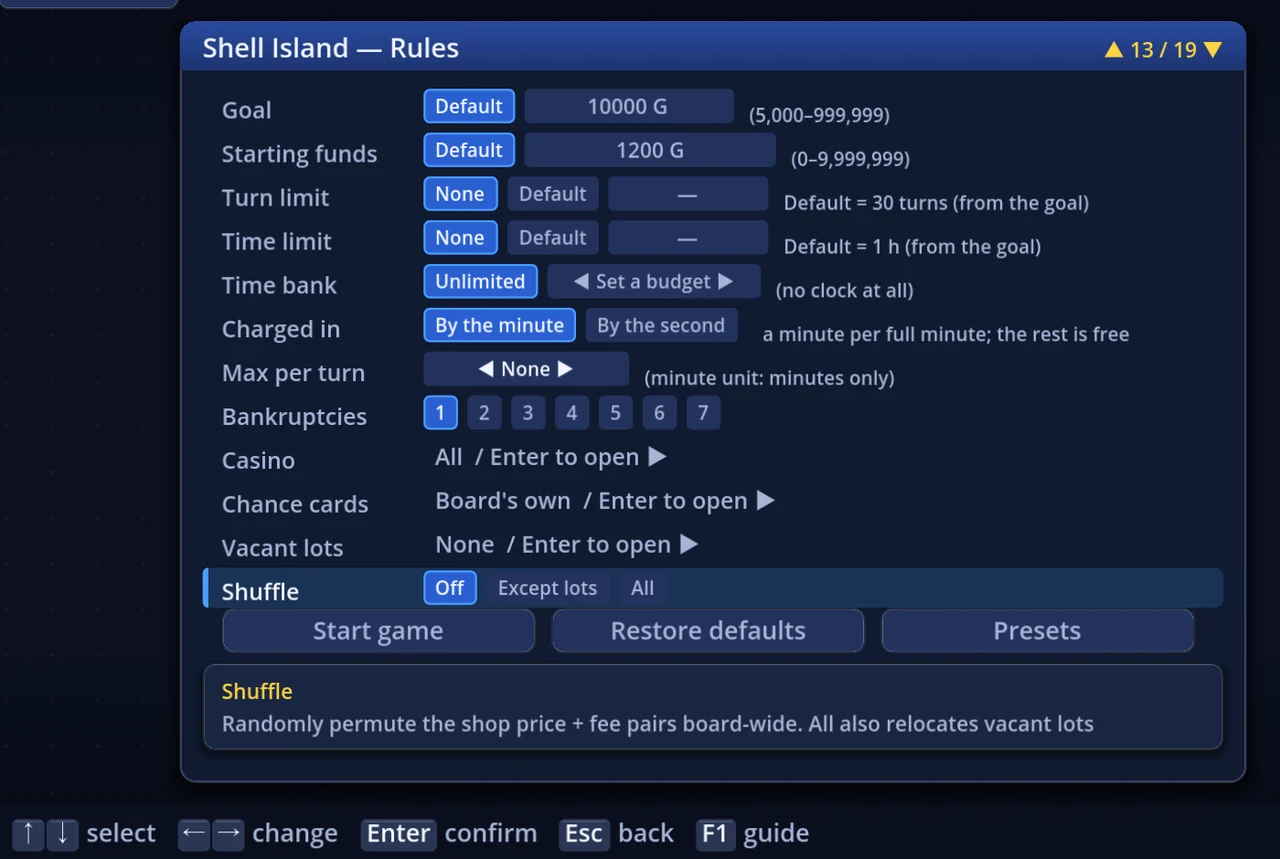
Pick it on the Shuffle row of Rule settings (press R on the board list). The default is Off.
1. The three settings
| Setting | What swaps | Vacant lots |
|---|---|---|
| Off (default) | Nothing | Stay as they are |
| Except lots | Shops swap among themselves — each shop's price and fee | Neither move nor change |
| All | Shops and vacant lots are swapped together | The lots move too |
- Press ← → on the row, or click a chip
- The swap happens once, at the start of the match. The arrangement never changes mid-match
- The setting is saved into rule-settings presets as well (→ "Rule settings")
2. What moves, and what stays
Shuffle moves the price-and-fee pair, and nothing else. The squares themselves and the shape of the districts stay as they were.
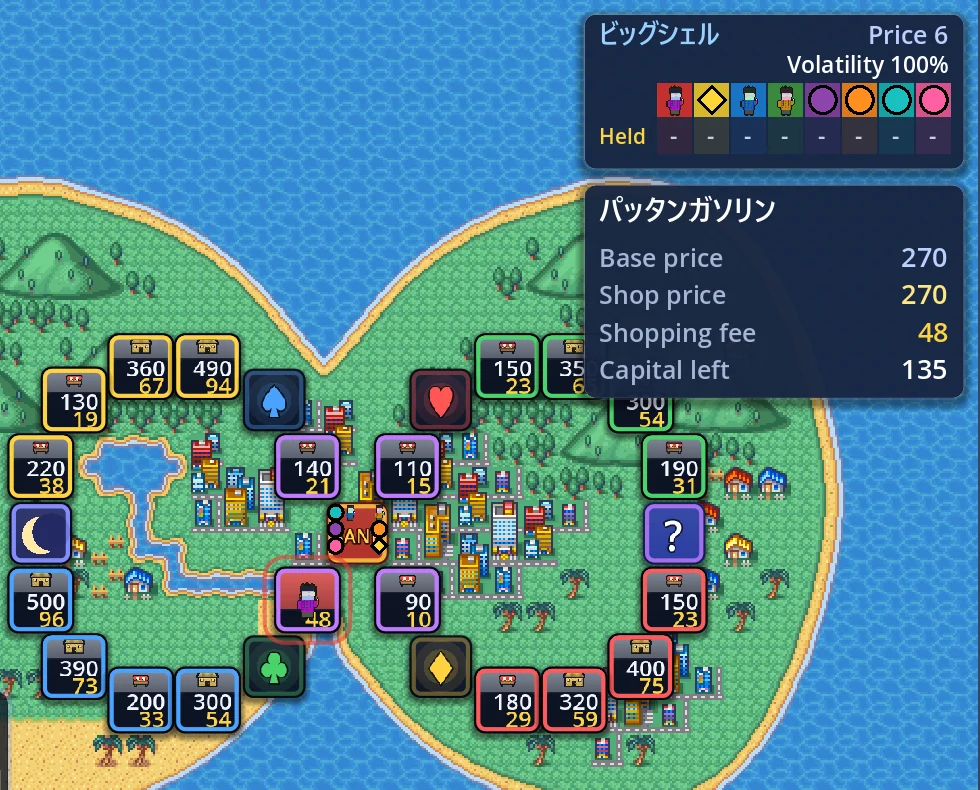
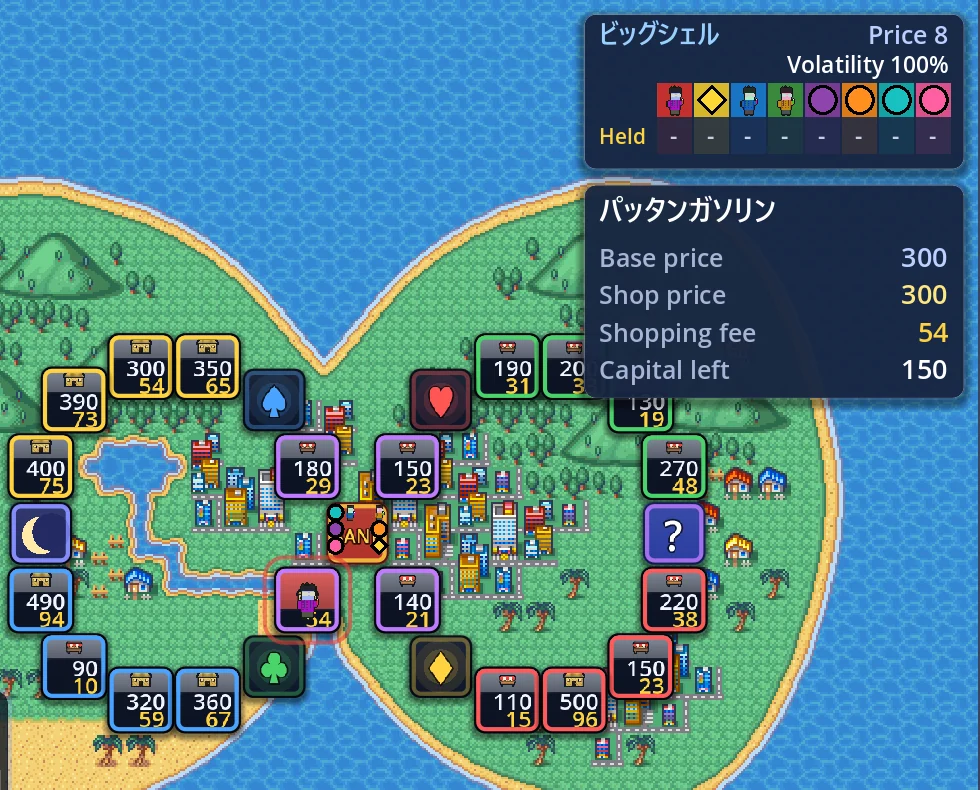
| Moves | Stays |
|---|---|
| A shop's price (its starting value) | Where every square is, and how they connect (the roads are the same) |
| A shop's fee (travelling with its price) | The districts — which shop belongs to which |
| A shop's look (the building drawn for its price tier) | A shop's name — names stay on their squares |
| With All only: where the lots are | Banks, suits, chance squares and every other non-shop square |
2a. Price and fee move as a pair
A price and its fee are never split up: they move to another shop together. Say the board starts like this:
| Square | Original price / fee | After a shuffle (example) |
|---|---|---|
| Shop A | 130 / 19 | 490 / 94 |
| Shop B | 220 / 38 | 130 / 19 |
| Shop C | 360 / 67 | 220 / 38 |
| Shop D | 490 / 94 | 360 / 67 |
The order changed, but "130 goes with 19" and "490 goes with 94" did not. So every shop keeps the same fee-to-price ratio (its yield) the board was built with. What shuffle changes is where the expensive shops are — not how good any single shop is.
2b. It mixes across districts
The swap is one shuffle over the whole board, not one per district. A district that used to be all cheap shops can end up with an expensive one, and the other way round.
- Stock prices come from the value of the shops in a district. With the prices moved, a district's stock price differs from the board's usual number
- A shop that belongs to two districts swaps its price like any other; the districts it belongs to do not change
2c. Shop names
Names stay on their squares. A shop called "Greengrocer" is still the Greengrocer in the same spot after a shuffle — only its price is new.
A shop that was never named — one still carrying the editor's price-as-name such as "Initial Value 360" —is renamed to its new price, so a name never contradicts the number next to it.
3. Except lots vs. All
3a. Except lots
Only shop prices are swapped. The vacant lots placed on the board are left out: they stay where they are, and they stay lots. Choose this to keep a board whose character comes from where its lots sit.
3b. All
Shops and lots go into one pile and are swapped together. A square that receives a lot becomes a vacant lot; a former lot that receives a shop's pair becomes a shop.
- The number of lots stays the same — only their places change
- Lots can move into other districts, so the mix of shops and lots inside a district changes too. A district can end up mostly lots, or with none at all
- On a board that starts with no lots at all, All and Except lots give the same result
4. Together with Vacant lots
Shuffle runs first; the Vacant lots rule runs after it.
- Shuffle swaps the shop prices (and, with All, the lot positions)
- Then the Vacant lots rule turns some of the already-shuffled shops into lots
That is why Except lots protects only the lots the board itself places. The lots the Vacant lots rule creates are chosen after the shuffle is over. For the Vacant lots levels, see §4 of "Rule settings".
5. Shops the board's author keeps in place
Some boards have shops their author left out of the shuffle —a landmark shop near the goal, a cheap shop for the opening laps: shops whose spot means something.
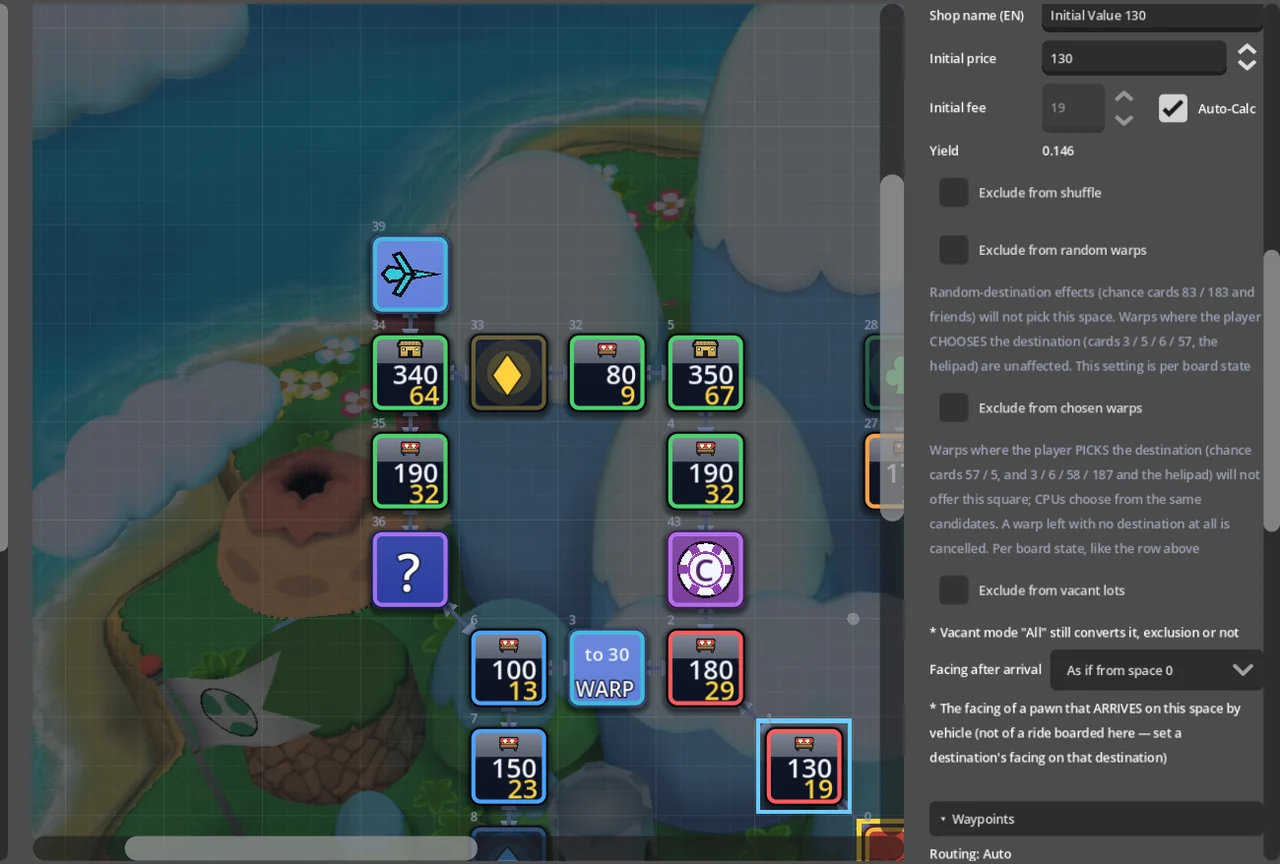
- A left-out shop keeps its own price and fee and does not move. Everything else swaps around it
- The same holds for All: a left-out lot stays a lot, in the same place
- The game does not mark which shops are left out. Take it as the author's intent
Board authors set this square by square in the editor (→ §5b of "Making a board").
6. During and after the match
- In a match, Data → Rules has a Shuffle row, so you can always see which setting the match started with
- Save and quit in the middle, and resuming brings back the same arrangement — it is not reshuffled
- It works in online play too. The room's host sets the rules, and everyone plays the same shuffled board
- CPU players think with the shuffled prices. Remembering the board's usual prices gains nobody anything
- Records → Achievements has achievements for playing, and for winning, with shuffle on
7. Tips
- Spend the first lap reading the board. The usual "expensive district" may not be expensive today. Check where the big prices landed on the map view
- Buy stock where the prices gathered. Stock prices come from shop value, so a district that drew several expensive shops starts with a higher stock price
- Except lots keeps the board's shape. The lot positions and the author's left-out shops still hold; only the prices are new. If you are trying shuffle for the first time, start here
- All is the wildest. With shops and lots trading places, the board plays like a stranger