Rule settings
Press R on the board list to open Rule settings. Whatever you leave here is what the match is played under.
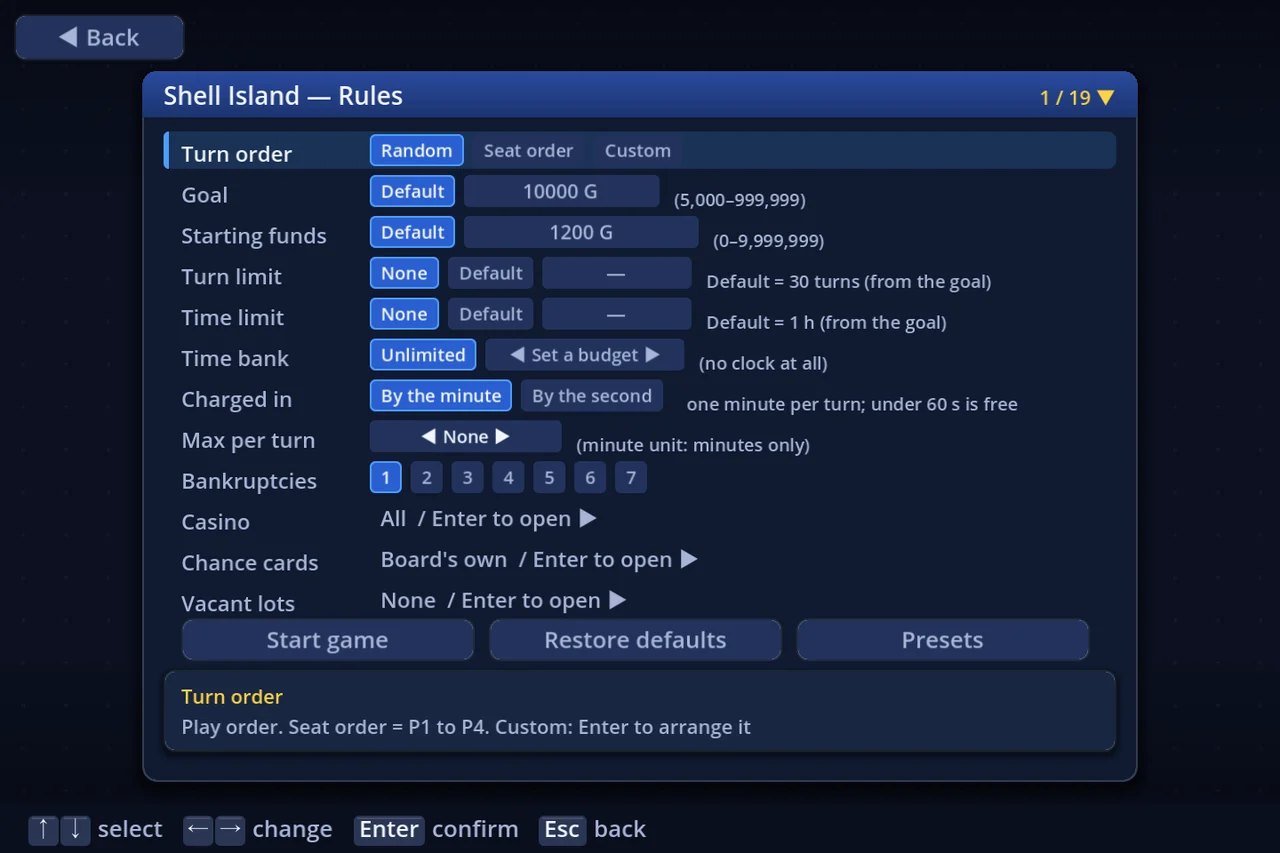
- ↑↓ picks a row, ←→ changes its value
- The box at the bottom explains the row you are on
- Rows that Enter opens (casino, chance cards, vacant lots, team rules, a custom turn order) say so on the row itself
- The bottom row holds Start game, Restore defaults and Presets
During a match, Data → Rules reads the whole set back.
1. The rows
| Row | Values | What it does |
|---|---|---|
| Turn order | Random / Seat order / Custom | Who goes when. Seat order = P1, P2, … Custom opens an arranger with Enter |
| Start squares | As authored / In turn order / Random | How the per-turn start squares are dealt. Only appears on boards that have several of them |
| Goal | None / Default / 5,000–999,999 | Reach this net worth, then a bank, and you win. Enter types it (0 = Default, the board's own recommendation). None is offered only once a Turn limit or Time limit is set |
| Starting funds | Default / 0–9,999,999 | What every seat starts with. Enter types it (← returns to Default, the board's own) |
| Turn limit | None / Default / 5–999 turns | The match ends once everyone has taken this many turns; the richest player wins. None by default |
| Time limit | None / Default / 5–999 min | The match ends at the end of the round in which the clock reaches 0; the richest player wins. None by default |
| Time bank | Unlimited / minutes | The time each player has for the whole match. Unlimited (no clock) by default |
| Charged in | By the minute / By the second | By the minute = a minute comes off for every whole minute of your own turn (a part-minute is free); by the second = counts down as it is spent |
| Max per turn | None / 1 min and up (1-minute steps by the minute; from 45 s in 15 s steps by the second). With a Time bank, it starts above the Grace when empty (3 min by the minute with the default grace) | How long one turn may take. When it runs out, the CPU plays that one turn for you (you are back on your next turn). None by default (10 min once a Time bank is set) |
| Grace when empty | seconds (120 s by default) | Each turn's allowance once the Time bank is gone; when it runs out, the CPU plays that turn. Only shown while there is a Time bank |
| Bankruptcies | 1 … (players − 1) | End the match after this many players go bankrupt; the richest survivor wins |
| Casino | Enter opens the picker | Which minigames appear. With none selected, landing on a casino just pays level × 10G |
| Chance cards | Enter opens the picker | Which chance cards this match draws. Board's own = that board's pool |
| Vacant lots | None / A few / Moderate / Many / All | How many shops start as vacant lots. Enter shows each level's extent |
| Shuffle | Off / Except lots / All | Permutes the board's (shop price, fee) pairs. "All" relocates the vacant lots too (→ "Shop shuffle") |
| Build limit | 1 / 2 / 3 / 4 / Unlimited | How many of each building may be built. Shops are exempt |
| Ruleset | Default / Legacy / Present / Modern / Custom… | The Legacy–Modern mix. Enter sets each element |
| Auction time | seconds (0.1 steps) | How long without a bid before an auction closes |
| Negotiation | On / No CPU→you / Player only / Off | Selling, buying and swapping shops. No CPU→you = CPUs never propose to people (they still deal among themselves). Player only = the CPU never proposes a deal |
| Auction ban | No / Yes | With Negotiation off, whether auctions stop too. Inert unless Negotiation is Off |
| Team rules | Enter opens a page | The 7 rules that apply in team mode (plus 3 └ sub-rows, each shown only when it has something to qualify). Also reachable from Player setup (added 2026-09-15) |
2. Goal and starting funds
The Goal is what ends the match. Left on Default it follows the selected board's own recommendation — pick another board and the number changes with it. To set your own, press Enter and type it; typing 0 puts it back on Default.
Starting funds is everyone's opening cash. Default is again the board's own, and ← returns to it.
The Default of Turn limit and Time limit is the board's own value if it sets one, otherwise it is worked out from the goal (the row shows "Default = …"). Once either is set, you can put the Goal on None and play a match decided purely on net worth after a fixed number of turns or minutes.
⚠ Starting funds at or above the goal decides the match before the first roll. On a board with a bank, whoever reaches one first wins immediately; on a board without one, it is over before anybody moves. The row warns you, but it does not stop you — it is a party setting.
3. Picking casinos
Enter on the Casino row opens Casino selection.
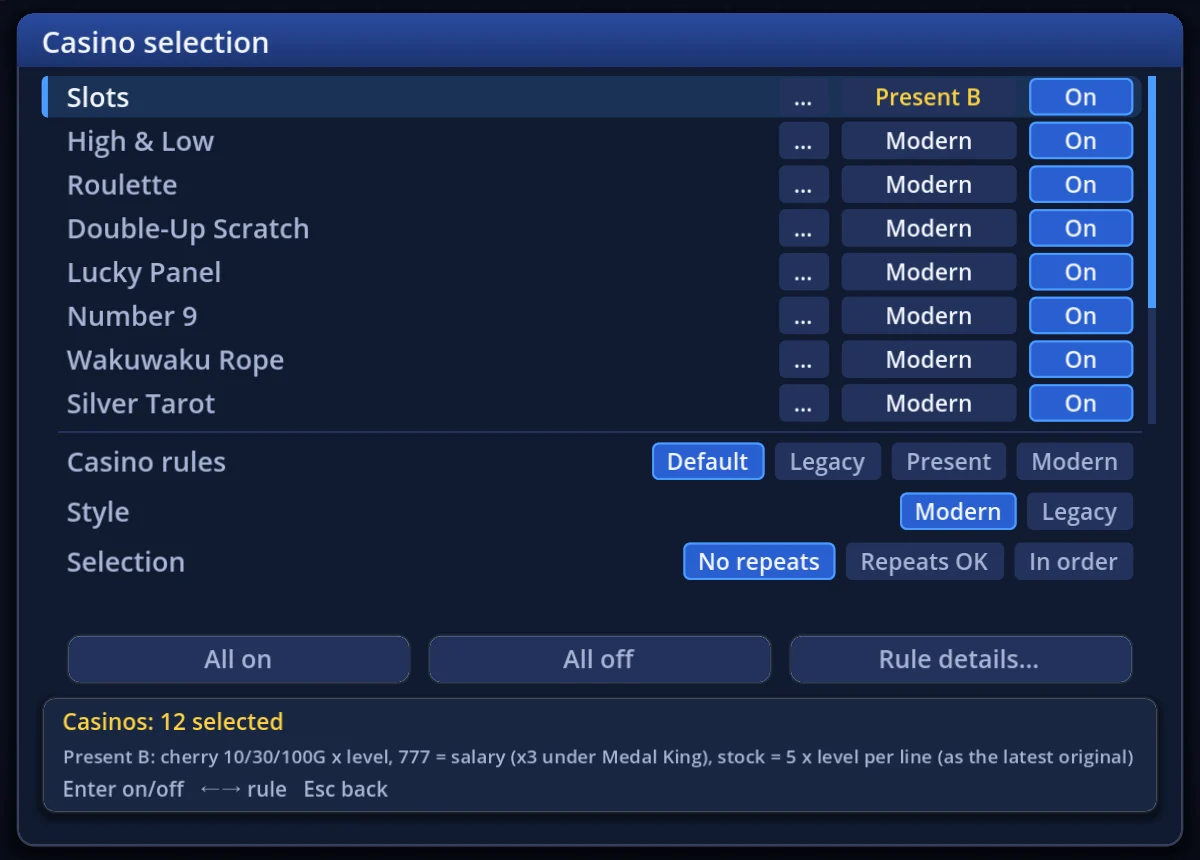
- Twelve games, each On or Off (Enter, or the On / Off chip at the right of the row, toggles it)
- Slots, High & Low, Roulette, Double-Up Scratch, Lucky Panel, Number 9, Wakuwaku Rope, Silver Tarot, Legacy Race, Modern Race, Treasure Hunt, Battle Colosseum
- Each game row shows a chip with that game's rule (Modern / Legacy and so on). ←→ or a click on the chip switches it. Turning a game off keeps its rule
- The … chip beside it opens a screen that sets that game's rules one element at a time (the Rule details… button below opens the same screen for the game the cursor was last on)
- Casino rules — pick Default / Legacy / Present / Modern and every game's rules become that preset's, at once (Style follows the preset too). Which games are on, and Selection, are left alone. When the rules match none of them the row reads Casino rules (custom)
- Style — Modern (follows Selection below) / Legacy (the slots and the other games take turns, either one first). Selection is unused under Legacy
- Selection — No repeats (never the same game twice running) / Repeats OK / In order. It is ignored with one game or fewer selected
- All on, All off and Rule details… buttons
Turn everything off and a casino square simply pays level × 10G when you land on it.
If the game rules you set here no longer match the preset on the rule screen's Ruleset row (Default and so on), that row becomes Custom.
How each game plays, and what it pays, is in "Casinos".
4. Vacant lots
Enter on the Vacant lots row offers five levels — how many of the board's shops start as buildable lots instead.
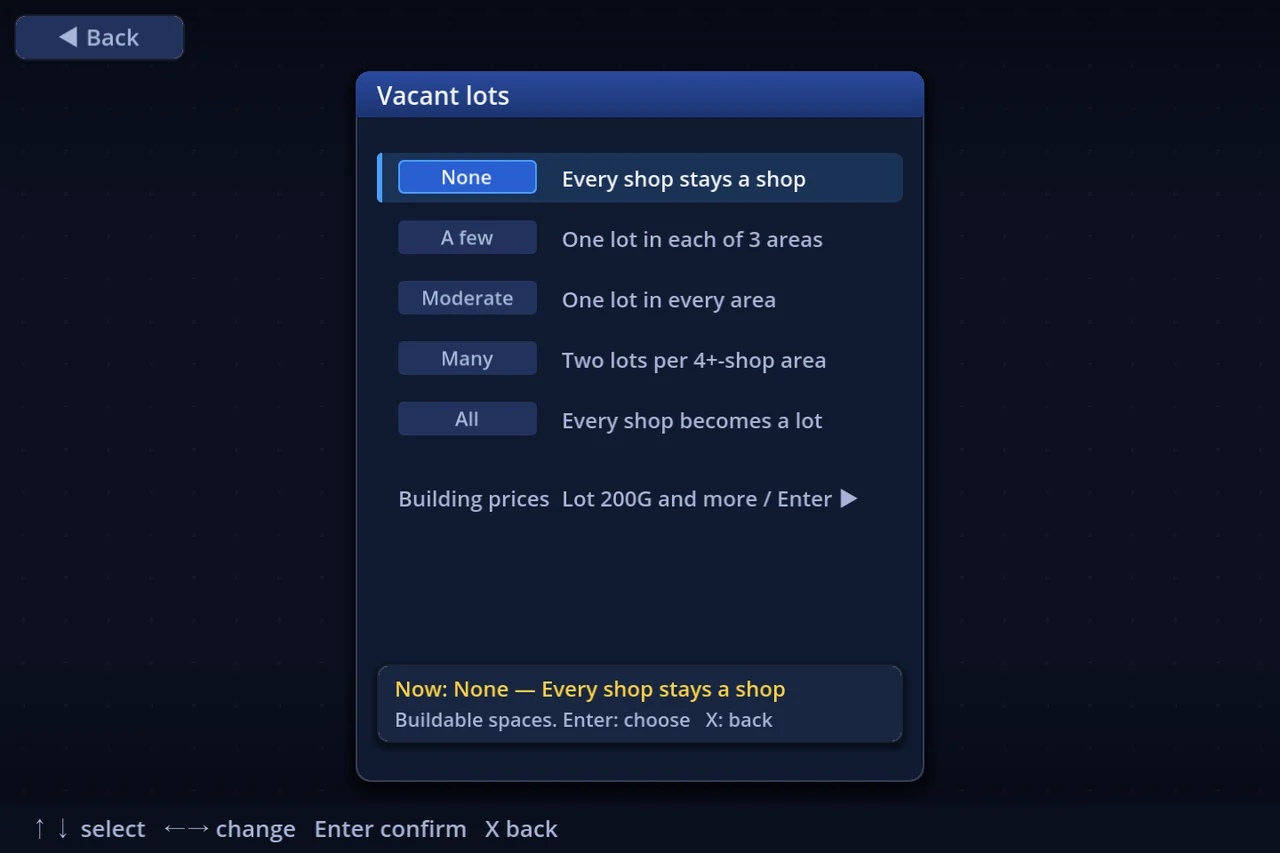
| None | Every shop stays a shop |
| A few | One lot in each of 3 areas |
| Moderate | One lot in every area |
| Many | Two lots per 4+-shop area |
| All | Every shop becomes a lot |
The same screen opens Building prices, where the cost of each building — and the numbers behind the toll booth, inn, my home and tax office — can be changed. The more of the board is lots, the more the match is about what you build on them.
5. Negotiation and auctions
- Negotiation — On (with anybody) / No CPU→you (CPUs never propose to people, but still deal among themselves) / Player only (the CPU never proposes) / Off
- Auction ban — with Negotiation Off, whether auctions stop as well. Note that chance card 74's auction and the forced sales that follow a shortfall still run
While Negotiation is anything but Off, the Auction ban row is drawn dim and does nothing.
6. Presets
The Presets button (or P) opens Rule presets: the whole rule screen, saved under a name. You can keep 100 of them.
| Key | What it does |
|---|---|
| Enter | Use the selected preset |
| K | Save the current settings as a new preset |
| U | Overwrite the selected one |
| N | Rename |
| C | Copy |
| ←→ | Move it up / down the list |
| Del | Delete |
| E / F | Export one / all to a file you can hand to somebody |
| I | Import from a file |
| M | Mark presets to share (as many as you like) |
| P | Share — publishes the marked ones (or, with none marked, the selected one) to the server, with a title and a description |
Player setup has the same machinery as Player presets (seat names, pieces, controls and colours, plus the player count and the team setup — split, turn order and team names). It is a separate list from the rule presets. An older preset that carries no player count or teams leaves yours as they are. When you share one, seat names and team names go in only if you choose "Include names". Settings → Other has presets for your settings and your controls too (see "Settings").
7. Worth knowing
- Restore defaults puts every row back to the shipped setting
- Your rule settings persist — the next match starts from what you left here
- The elements behind the Ruleset row are covered in "Legacy and Modern"
- Player count lives on Player setup — see "More players, and teams". Team line-ups are there too, but the Team rules row is on THIS screen as well (added 2026-09-15)